![logo-effectconnect-liggend-2021.png]](https://www.effectconnect.com/hs-fs/hubfs/Logo%20EffectConnect/logo-effectconnect-liggend-2021.png?height=24&name=logo-effectconnect-liggend-2021.png)
- Go to Apps > Your apps (Channelmanager) in the EffectConnect menu on the left
- View your Bol channel by clicking on the blue eye
- Choose Settings > Connection to merchant account > access to your bol account
- Click on Renew authorization via Bol
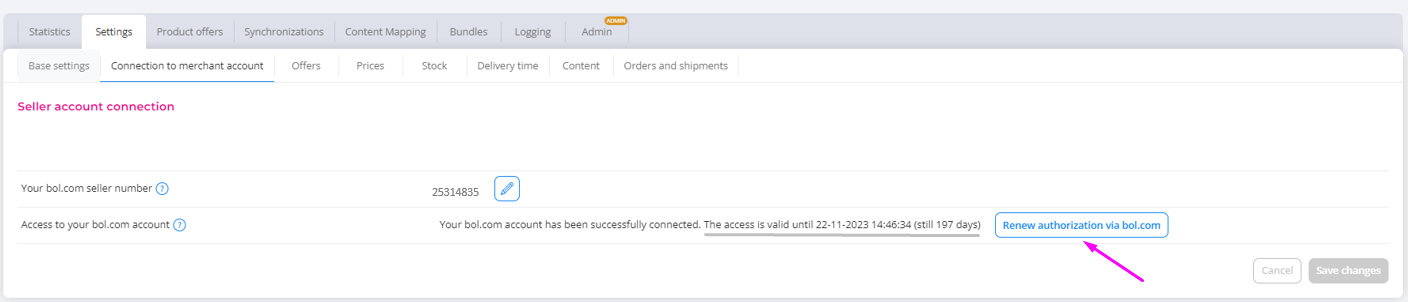
-
You will be redirected to the https://login.bol.com website
- After logging in, you will be asked to authorise EffectConnect (valid for 365 days).
- You are asked to specify the permissions the integration should have, these are the permissions that allow the integration to access your Bol account to perform tasks such as importing orders or updating inventory levels.
- Enable all permissions, this prevents potential authorisation requests later on. Without these permissions enabled, the processes, or parts of them, cannot communicate with your Bol account.
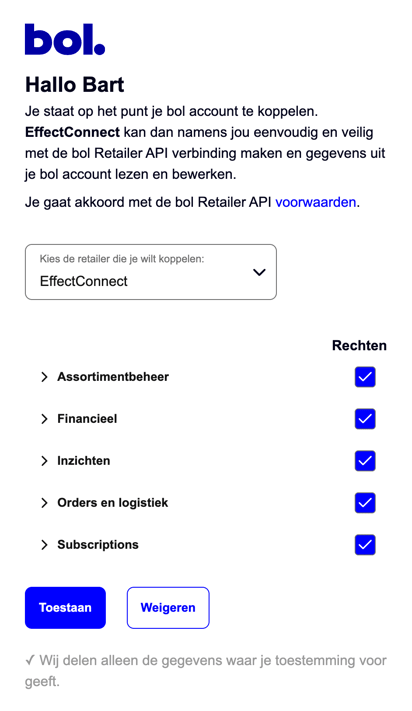
- Grant access, and voilà, your token will be refreshed.
If the token expires, EffectConnect will be unable to retrieve or send data to bol, leading to outdated stock, prices, delivery times, product information, and unimported orders. We will inform you in advance of the token's expiration date, but please remember that it is your responsibility to renew the token.