![logo-effectconnect-liggend-2021.png]](https://www.effectconnect.com/hs-fs/hubfs/Logo%20EffectConnect/logo-effectconnect-liggend-2021.png?height=24&name=logo-effectconnect-liggend-2021.png)
On many marketplaces, you can group related products into product families so that variations of the same item are presented together. A typical example is a pair of shoes offered in multiple sizes. Once you have set up a product family, the marketplace will display these products as a single collection or family on the product detail page.
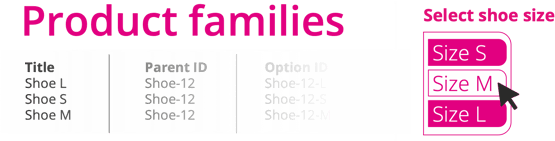
The way you create these product families can differ per marketplace. Some marketplaces (such as bol and Amazon) allow you to define product families via the content mapping.
When you create product mappings, look for a column labelled ‘parent ID’. In this column, you enter an identifier that represents the family. For example: if you have products SHOE-A, SHOE-B and SHOE-C and you want to group them into one family, all three products must have the same parent ID.
If you do not yet have a parent ID available, you can:
-
add a new attribute for the parent ID in your source data (for example in your webshop)
-
use custom attributes to assign a parent ID to your products.
If you cannot find a parent ID option in the mapping group, please contact the marketplace and ask them how product families should be created in their system.