![logo-effectconnect-liggend-2021.png]](https://www.effectconnect.com/hs-fs/hubfs/Logo%20EffectConnect/logo-effectconnect-liggend-2021.png?height=24&name=logo-effectconnect-liggend-2021.png)
When you create mapping groups in EffectConnect, you link your product information to the fields required by a marketplace. Product information such as the title and product description is imported into EffectConnect from your webshop or source system and then sent to the marketplace.
Before EffectConnect exports this information, we take into account the formatting supported by the marketplace. This prevents unsupported HTML from being displayed incorrectly.
Basic HTML
EffectConnect sends basic HTML by default when supported by the marketplace. This includes, for example:
- bold text;
- bullet points;
- basic text formatting.
You don't need to enable any additional settings for this.
Using complex HTML
For certain fields in the mapping, such as the product description, you can enable the HTML editor.
When you enable this option, the input field for a custom value changes from a plain text field to an HTML editor. You can then use HTML to format your text.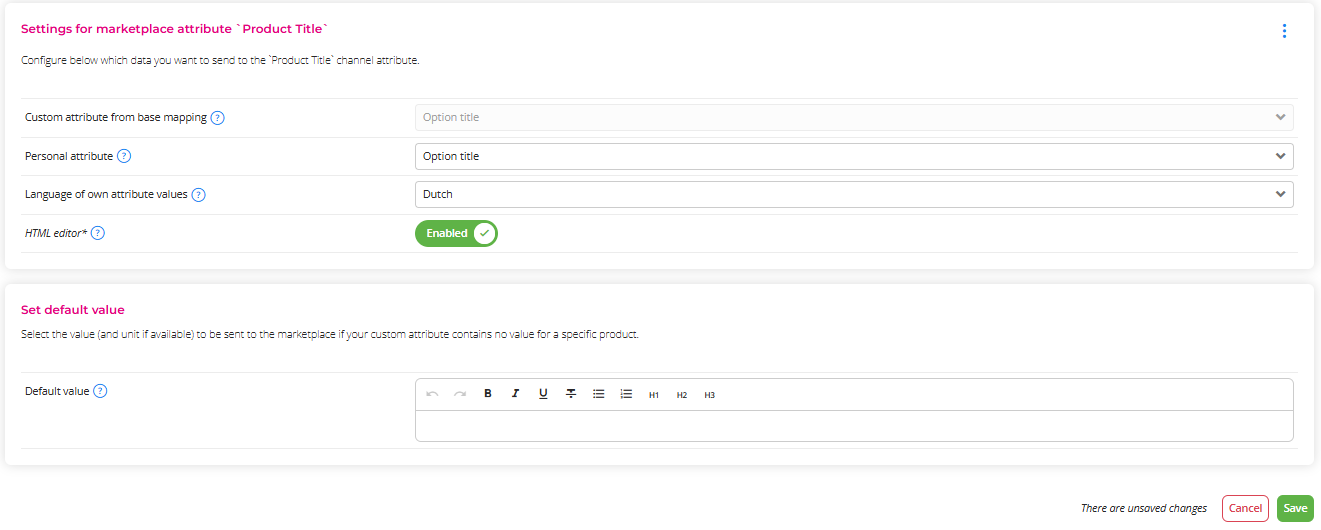
 Only use this option if the marketplace supports complex HTML. If it doesn't, the HTML may be filtered out or displayed incorrectly.