![logo-effectconnect-liggend-2021.png]](https://www.effectconnect.com/hs-fs/hubfs/Logo%20EffectConnect/logo-effectconnect-liggend-2021.png?height=24&name=logo-effectconnect-liggend-2021.png)
Go to
The release notes list all EffectConnect updates: new features, improvements and bug fixes.
Where can you find the release notes?
- Go to your Dashboard
- Click View release notes

What’s in the release notes?
The overview shows all recent updates, with the newest at the top. Each update includes a short description of what has changed, for example:
- New features: new options in EffectConnect or in a connection.
- Improvements: changes that make existing features faster or easier to use.
- Bug fixes: issues that have been resolved.
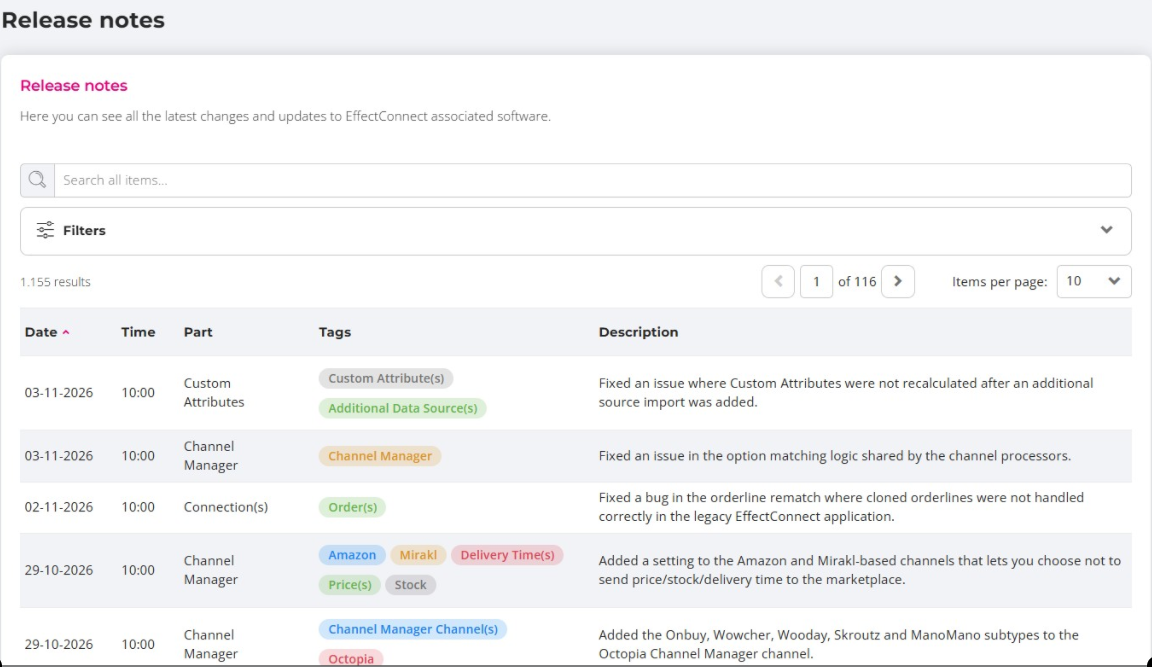
How to quickly find an update
- Search: enter a keyword in the search bar, such as the name of a marketplace or module.
- Filter: filter by date, section or tag to see only the updates that are relevant to you.
 Check the release notes regularly, for example once a month. That way, you won’t miss any new features and you’ll get the most out of EffectConnect.
Questions about an update? Please contact us. We’re happy to help.