![logo-effectconnect-liggend-2021.png]](https://www.effectconnect.com/hs-fs/hubfs/Logo%20EffectConnect/logo-effectconnect-liggend-2021.png?height=24&name=logo-effectconnect-liggend-2021.png)
Go to
- What is Track & Trace mapping and what do you use it for?
- Where can you find the Track & Trace mapping?
- Add a new carrier
- Create a new Track & Trace mapping rule
- Track & trace rules that need attention
What is Track & Trace mapping and where do you use it for?
When you use multiple carriers for the shipment of your orders, Track & Trace mapping is needed to give correct shipment details to the marketplaces.
For example, when you use PostNL, DPD, and DHL as carriers, you need to create a Track & Trace mapping for these three carriers. If you don't use Track & Trace mapping, you can only use the single carrier that is configured in your channel settings.
Where can you find the Track & Trace mapping?
Go to Sales > Track & Trace mapping
If you have already created rules, you will see an overview of the mapped carriers here.
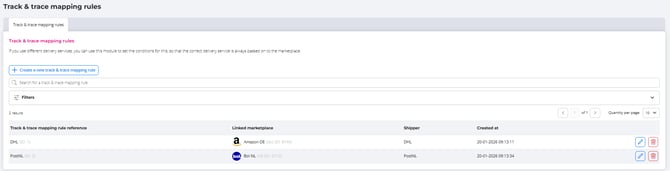
Add a new carrier
Create a new Track & Trace mapping rule by clicking on the blue 'new rule' button in the top right corner.
Create new Track & Trace mapping rule
A Track & Trace mapping rule is built using if–then–and/or logic. Define the conditions a shipment must meet to fall under a specific Track & Trace mapping rule.
Track & Trace mapping rule reference: give the rule a clear and recognizable name.
Marketplace to which this mapping rule applies: select All marketplaces or choose a specific marketplace.
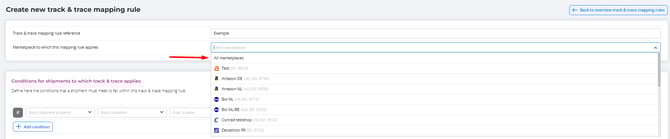
Shipment conditions for Track & Trace
Set the conditions based on one or more of the following elements:
-
T&T URL
-
T&T code
-
Shipper (carrier)
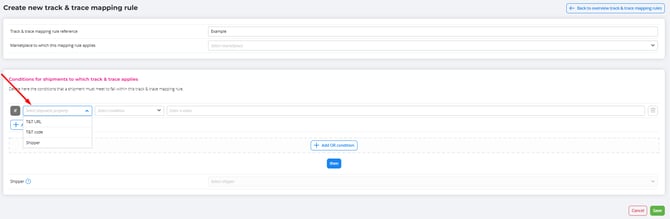
At the bottom of the rule, select the corresponding shipper (carrier)
 The list of available carriers is automatically and directly retrieved from the marketplace you selected when creating the rule.
Good to know: The carrier TNT is equivalent to PostNL. Some marketplaces still use this former carrier name.
Example:
If the tracking code starts with 3S, or the tracking URL contains post.nl, then assign the carrier PostNL to the order.
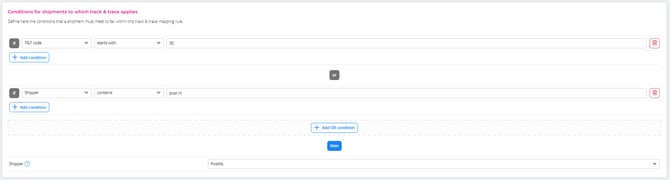
Click Save to store the rule.
Track & Trace mapping rules that require attention
A red or orange triangle indicates that a Track & Trace mapping rule requires attention.
A rule appears in this overview when:
-
No marketplace or carrier is linked to the rule
-
The linked marketplace no longer exists
-
The linked carrier no longer exists
Please reach out to our Customer Support consultants if you have any questions!