![logo-effectconnect-liggend-2021.png]](https://www.effectconnect.com/hs-fs/hubfs/Logo%20EffectConnect/logo-effectconnect-liggend-2021.png?height=24&name=logo-effectconnect-liggend-2021.png)
Go to
- More about content
- What is content mapping?
- Where to find the content mapping
- How to use content mapping
- Set base mapping rule
- Set new content mapping rule
- Mapping views
- Attributes explained
- Content export to the marketplace
- FAQ
- Need help mapping or want us to map for you?
More about content
Content it is essential for creating or updating your products on a marketplace. It contains important information that helps buyers understand the product and make informed decisions when purchasing.
Why content mapping?
If a product is not yet listed on the marketplace, or if its product information is incomplete or inaccurate, you use our content mapping to send product information such as titles, descriptions, features and images to the marketplace.
 Note: Each marketplace has unique content requirements, so the attributes or set up of the attributes to provide may vary. We recommend contacting your marketplace representative for specific guidelines.
We recommend including as many relevant product attributes as possible within EffectConnect and ensuring a consistent structure for the attribute values.
Where to find the content mapping
Go to the channel you wish to map your content for and select the tab Content mapping.

How to use the content mapping
The content mapping exists of two elements:
- Base mapping
The base mapping contains attributes that are required in at least 50% of the marketplace's categories. The attributes mapped here, which will then flow automatically into your into your underlying mapping rules per category.
You have the flexibility to choose not to use the base mapping value, allowing you to customize the underlying mapping rules by defining your own attributes or values as required. - Mapping rules
These mapping rules allow you to match your products to marketplace categories by retrieving the required category attributes from their data model, enabling you to map and export the correct content.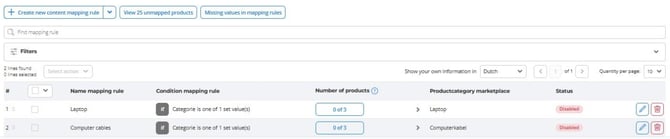
The attributes shown in the mapping are directly retrieved from the marketplace's data model, and we cannot control the specific information they require.
Set base mapping rule
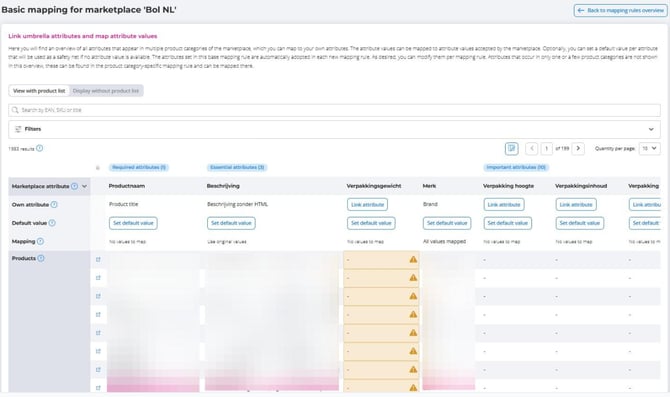
Open the relevant channel in EffectConnect > tab 'Content mapping' > click Set basic mapping rule.You will now see an overview of all the attributes that are common across multiple product categories within the marketplace.
Click 'Link attribute'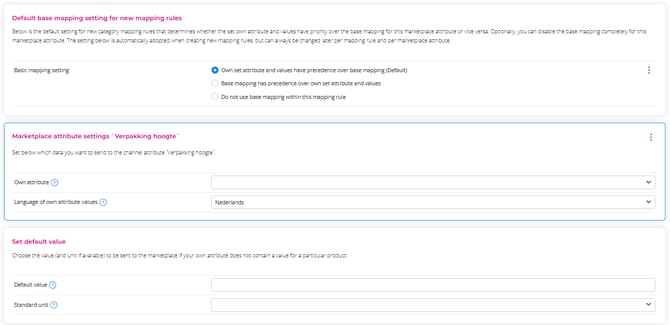
- Then, click on 'Own attribute' and select your desired attribute from the dropdown menu.
- Set default value: for each attribute, you can define a default value that will be used as a fallback in case no specific attribute value is available (optional).
Attributes that are present in only one or a few product categories will not appear in the base mapping overview. Instead, you can find them in the specific mapping rules, where you can map them accordingly.
Deviating from Base Mapping
You can decide whether to use the base mapping of deviate from it.
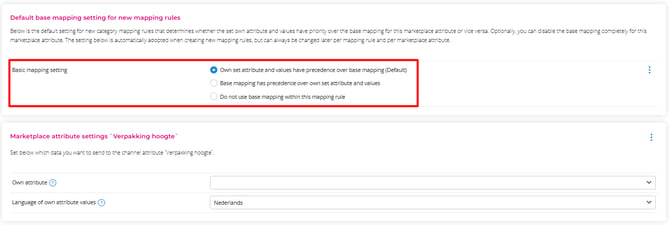
When you click on an attribute in either the base mapping or the underlying mapping rules, you will have the option to choose from the following settings:
-
Own set attribute and values have precedence over base mapping (Default)
-
When you set attributes in the category mapping rules, these will take precedence over any values you have set in the base mapping for the same attribute. In other words, the base mapping serves only as a fallback option when no specific value has been assigned.
-
-
Base mapping has precedence over own set attribute and values
-
The base mapping takes priority over any custom attributes or values you have set in the category mapping rules.
-
-
Do not use base mapping within this mapping rule
-
The base mapping value for this attribute will be ignored in the category mapping rule.
-
Set new content mapping rules
Folow this flow to learn how to set a mapping rule > click get started.
Mapping views
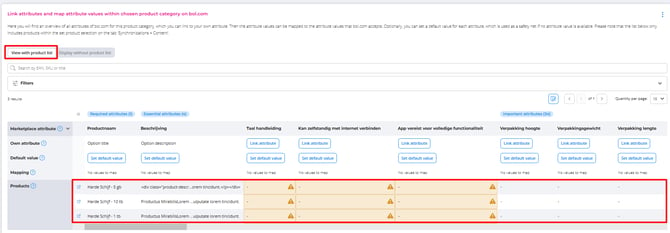
- View with product list
When you select this view, you will see the mapped value for each product within this mapping rule. The attributes are displayed from left to right, while the mapped values for each product are listed from top to bottom.
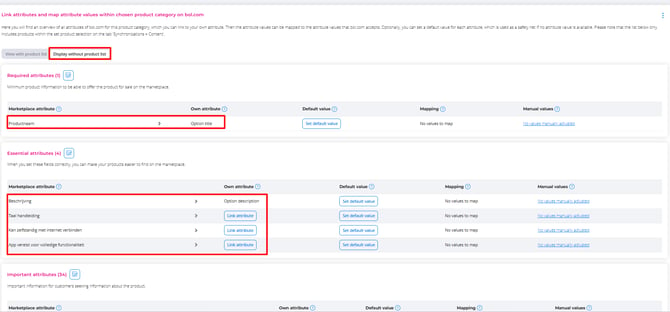
- Display without product list
When you select this view, you will see a comprehensive overview of all the required attributes, allowing you to map them in a clear and organized manner. Once you have completed the mapping, you can switch to the view with product list to verify whether each product has been assigned a value.
Attributes explained
Some marketplaces may require essential attributes to be filled out as mandatory. Therefore, it is important to provide as much information as possible or carefully review their content guidelines.
Type of attributes
- Required attributes: minimum content required to list the product for sale
- Essential attributes: provide as much information as possible to enhance product visibility.
- Important attributes: optional
- For Bol > Assets: All about images
Own attribute: when you use your own attributes, EffectConnect will retrieve and export the value of this attribute for each product in your product selection.
Default value: by defining a default value, all products within the mapping group will automatically be assigned the same value for that attribute. This default value also serves as a fallback option in case a specific attribute value is not available for any product in the mapping.
Manual value: here, you assign a specific custom value to each individual product in the mapping.
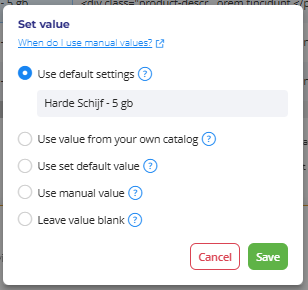
Set value: after mapping all attributes, you can customize individual product settings by clicking on the mapped value for that product to modify it.
Question mark: Click on the question mark next to the specific field to learn more about the requested attribute or value.
Missing the right content of attribute values? With a custom attribute, you can create a new attribute using existing data that contains the required content for the marketplace. You can then link this custom attribute within your mapping.
For more information about custom attributes, click here.
Content export to the marketplace
After you have completed all your mapping rules, make sure that the relevant rules are activated.
EffectConnect will use the active mapping rules to export your product content to the marketplace. This may include product titles, descriptions, features, images, and other marketplace-specific attributes that you have mapped.
EffectConnect will process the export according to the synchronization schedule for the relevant channel. If you want to know when and how often this happens, please read the article about our synchronization intervals here.
FAQ
A product is included in multiple mapping rules—which one is used?
A product is only ever exported through one mapping rule: the one with the highest priority. Inside a mapping rule, tab 1 shows the products actually being sent through this rule, and tab 2 shows products in your selection that are handled by another rule.
➡️Change the priority by dragging your mapping rules in the overview.
I can’t find the right attribute value in my catalog. What should I do?
If the marketplace asks for a value you don't have in your catalog, create a custom attribute based on data you do have, then link that custom attribute in your mapping as your own attribute. If the value is the same for every product in the mapping rule, setting a default value is quicker.
Why are some fields highlighted in red or yellow?
Red means required values are missing, yellow means essential information is missing. Red fields prevent your products from going live on the marketplace; yellow fields mainly reduce your visibility. Fill these in before activating the mapping rule.
Make sure to carefully review the content guidelines provided by the marketplace and make necessary adjustments to your content in EffectConnect. It is important to align your content with the marketplace's requirements to ensure successful synchronization.
Need help mapping or want us to map for you?
Please don't hesitate to reach out to our team of Customer Success consultants. They are here to provide you with the support and information you need.