![logo-effectconnect-liggend-2021.png]](https://www.effectconnect.com/hs-fs/hubfs/Logo%20EffectConnect/logo-effectconnect-liggend-2021.png?height=24&name=logo-effectconnect-liggend-2021.png)
Go to
- What are order attributes?
- Example: choosing a shipping method based on weight
- Where can you use order attributes?
- How to set up order attributes
- Order attributes or order tags?
What are order attributes?
Order attributes are extra data fields you add to an order automatically, based on conditions you set yourself. The conditions are based on the properties of the products in the order, such as weight or price.
An order attribute has a code and one or more values. For example: the attribute Order size with the value Large or Small.
Example: choosing a shipping method based on weight
You want to ship heavy orders with a different carrier than light orders.
- Create an order attribute Order size.
- Set the condition: is the total weight more than 30 kg? Then the value is Large, otherwise Small.
- In your back-office system, choose the shipping method based on this value.
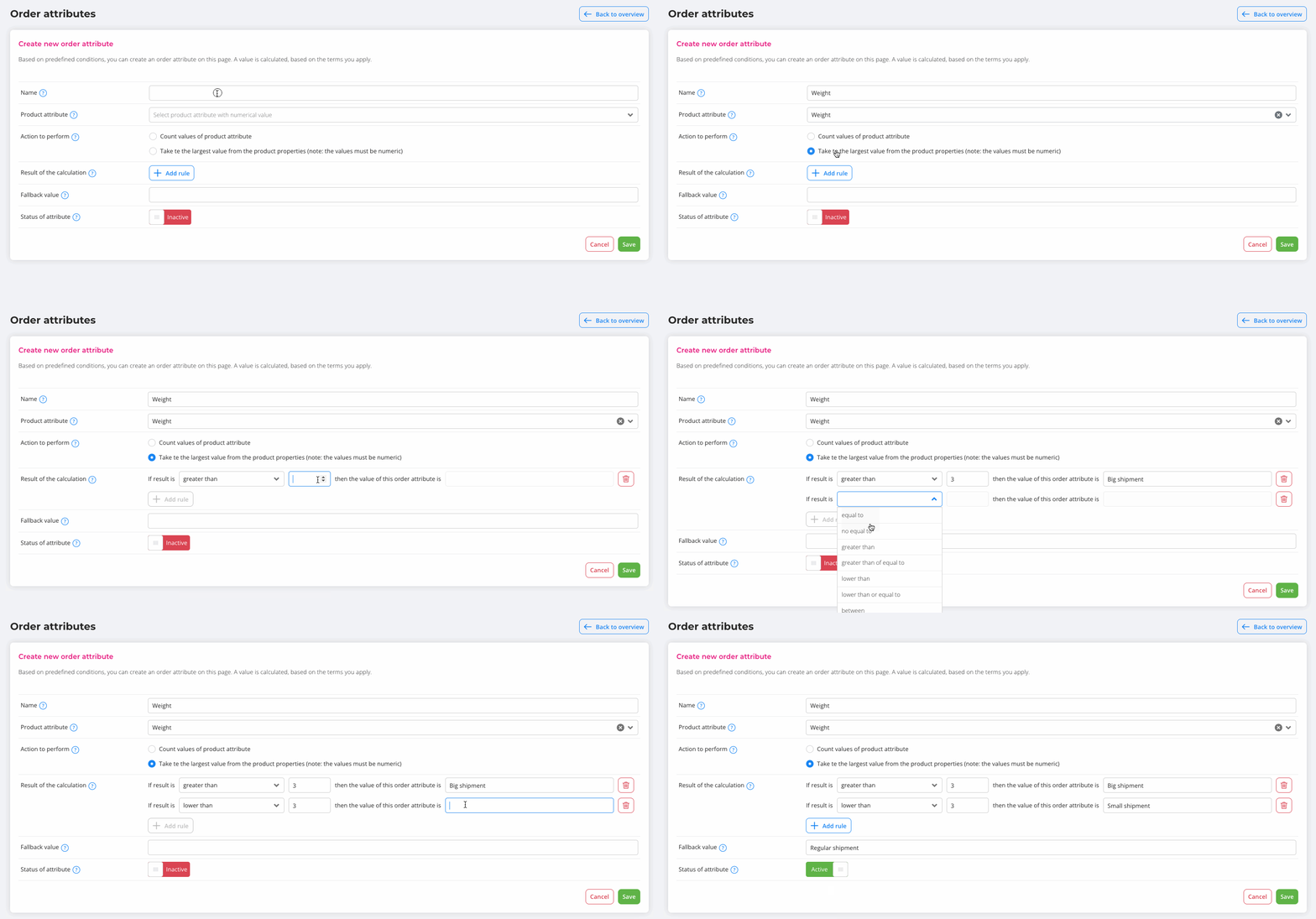
You can also use order attributes to mark orders above a certain amount, for example.
Where can you use order attributes?
- On the order detail page: you can see the order attributes of an order under Order attributes on the order detail page. Read more about the order detail page.
- Logic4: with a Logic4 connection, you can select the shipping method based on order attributes. Read more here.
- Custom API connection: in API v3, order attributes and order line attributes are included in the order data. This lets you read them and use them in your own system.
ℹ️ Please note: For all other webshop connections and plugins , order attributes are visible in EffectConnect, but they are not yet used for follow-up actions in your webshop.
How to set up order attributes
- Go to Orders > Order attributes.
- In the overview, you can create new order attributes or change or delete existing ones.
- Set the conditions and the value the order should receive.
- Save the order attribute.
Order attributes or order tags?
Both add information to an order, but they work differently:
- Order tags are labels. An order either has the tag or it doesn’t. You can use tags in queue rules, for example to hold orders back from export.
- Order attributes are data fields with a value, based on the products in the order. They’re mainly meant to pass extra information on to your back-office system.
Questions about order attributes? Please contact us. We’re happy to help.