![logo-effectconnect-liggend-2021.png]](https://www.effectconnect.com/hs-fs/hubfs/Logo%20EffectConnect/logo-effectconnect-liggend-2021.png?height=24&name=logo-effectconnect-liggend-2021.png)
Does the price displayed in EffectConnect not match the price on the marketplace? There can be several reasons for this, such as synchronization delays, channel settings or price prioritization.
Follow the steps below to identify the cause and resolve the issue.
1. Check the synchronization time
Price changes in EffectConnect are not always immediately visible on the marketplace. It may take some time before the marketplace receives and processes the updated price.
➡️ Before investigating further, make sure enough time has passed for the price synchronization to complete.
Learn more about how often EffectConnect synchronizes your data.
2. Check your channel's price synchronization settings
Make sure price synchronization is enabled for the marketplace channel.
You can check this in the price settings for the specific channel.
➡️ If price synchronization is disabled, EffectConnect will not send price updates to the marketplace.
3. Check your price prioritisation settings
EffectConnect supports different pricing methods, such as fixed prices, the Repricer and the Price Planner.
If multiple pricing methods apply to the same product, the price prioritization settings determine which price is sent to the marketplace.
➡️ Check the price prioritization in your channel's price settings to see which pricing method has the highest priority.
4. Check whether your product is included in multiple Repricer rules
A product can be included in multiple Repricer rules, but only one calculated price will be sent to the marketplace.
To check which Repricer rules apply to a product:
- Open the specific product in EffectConnect
- Go to the Repricer tab.
- Check which Repricer rules are linked to the product.
➡️ Review the rules and their settings to determine which price should apply.
5. Check which price EffectConnect sent to the marketplace
You can check the price EffectConnect has sent to the marketplace directly from the product details.
To view this information:
- Open the product in EffectConnect.
- Go to the Channels tab.
- Select the relevant marketplace.
- Click the clock icon to view the export history
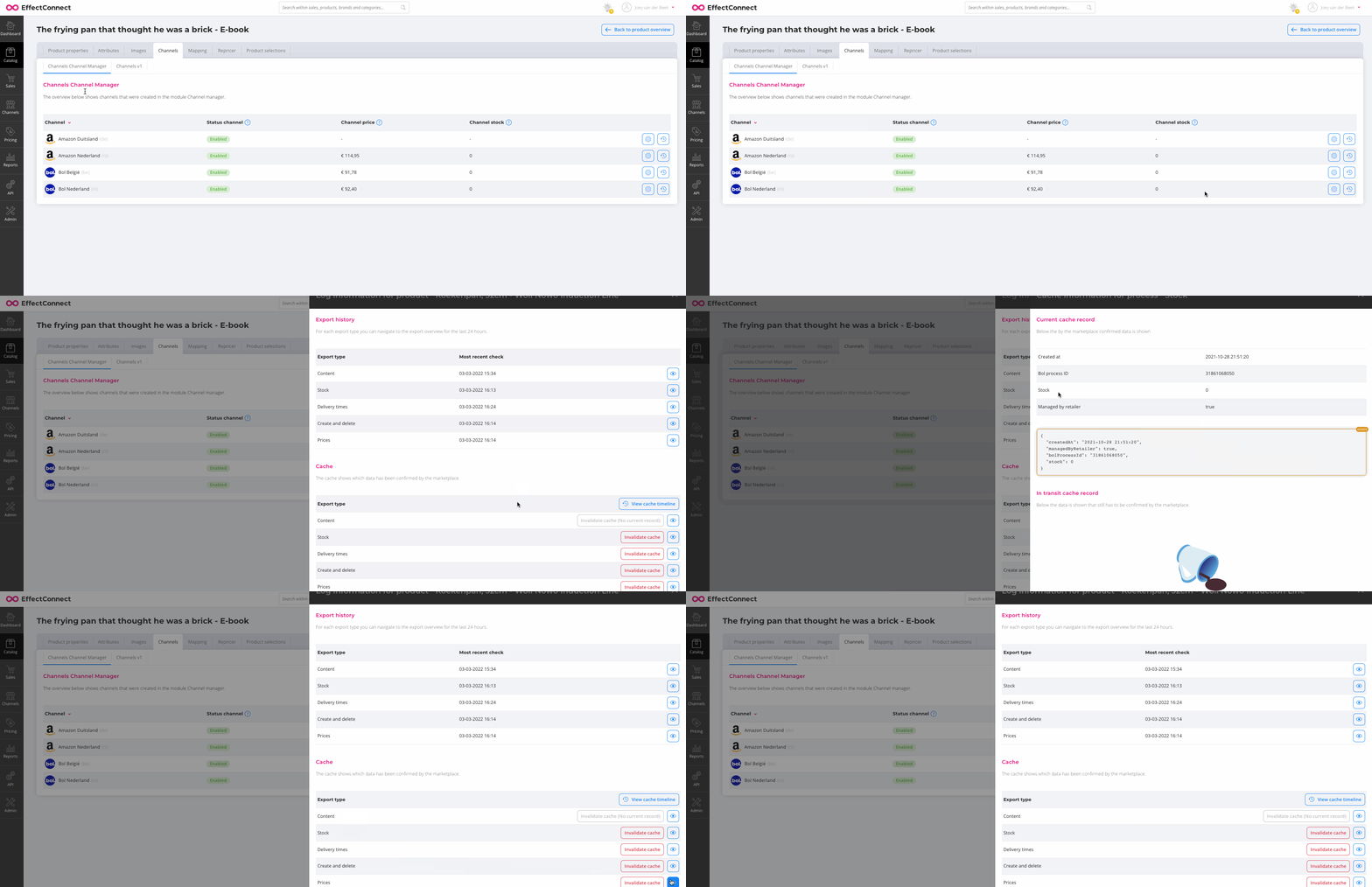
➡️ This helps you determine whether EffectConnect has sent the expected price.
If the correct price was sent but is not displayed on the marketplace, the marketplace may not have processed the update yet.
Still seeing an incorrect price?
If you've completed these checks and the price still doesn't match, contact our Customer Success team. We're happy to help!