![logo-effectconnect-liggend-2021.png]](https://www.effectconnect.com/hs-fs/hubfs/Logo%20EffectConnect/logo-effectconnect-liggend-2021.png?height=24&name=logo-effectconnect-liggend-2021.png)
Has your product information suddenly changed on a marketplace, or are your updates not appearing? This can happen for several reasons, including brand registration, brand ownership, missing product information or marketplace-specific requirements.
Each marketplace has its own rules for managing product information. Follow the steps below to identify what may be causing the issue.
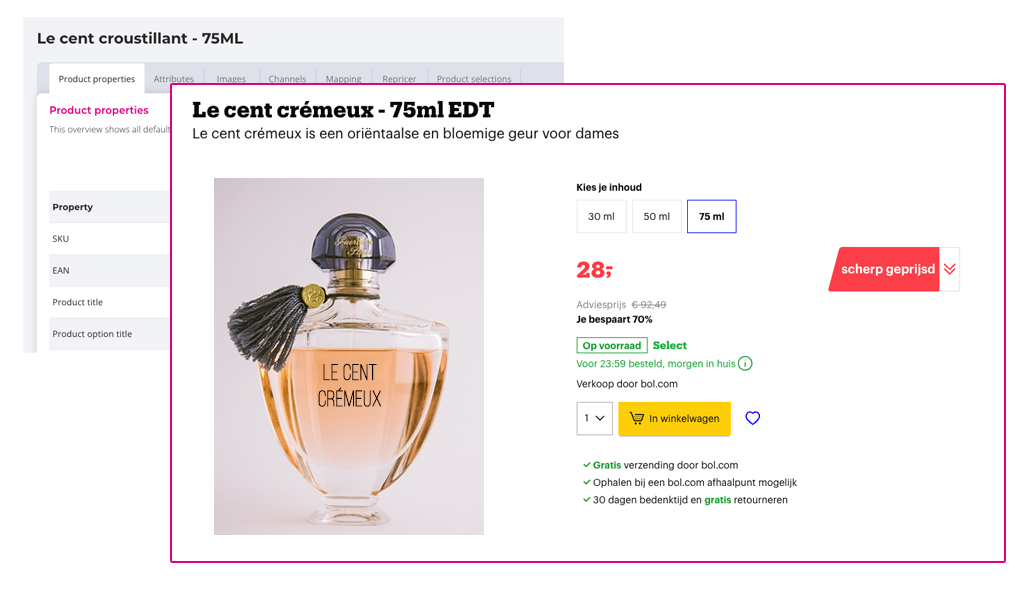
For example: the title in EffectConnect differs from the title on the marketplace:
1. Check brand registration and ownership
Multiple sellers can offer the same product on a marketplace. However, not every seller has permission to change its product information.
Some marketplaces give priority to information provided by the registered brand owner or an authorized seller. This means that another seller's product information may take priority over yours, even when EffectConnect has successfully sent your updates.
➡️Check the marketplace's requirements for brand registration and product ownership to find out whether you have permission to update the product information.
2. Check your product content
Marketplaces often require specific product information before they accept or publish updates. These requirements can differ by marketplace and product category.
Make sure your product information is complete and that your Content Mapping in EffectConnect includes all mandatory fields.
Also check the logging in EffectConnect for any errors returned by the marketplace. These may indicate missing information, incorrect values or other content requirements that have not been met.
3. Check your product synchronization
Before contacting the marketplace, make sure EffectConnect is sending your product information correctly.
➡️Follow our product synchronization troubleshooting checklist to check your settings, product data and synchronization.
Remember that changes may not appear immediately. The marketplace may need additional time to process your updates.
4. Check the marketplace's requirements
Every marketplace has its own rules for creating and updating product information.
For example, some marketplaces only allow registered brand owners to change certain fields, while others have additional requirements for specific product categories.
➡️ Check the requirements of the marketplace you're selling on to find out which rules apply to your products.
5. Contact the marketplace
If EffectConnect has successfully sent your product information but your changes still don't appear, contact the marketplace's seller support team.
They can help you determine whether the issue is related to brand ownership, permissions, mandatory content or other marketplace-specific requirements.
➡️Tip: Check our marketplace-specific knowledge base articles for additional information about the marketplace you're selling on.
If you're unsure whether your product information is being sent correctly from EffectConnect, contact our Customer Success team. We'll help you investigate.