![logo-effectconnect-liggend-2021.png]](https://www.effectconnect.com/hs-fs/hubfs/Logo%20EffectConnect/logo-effectconnect-liggend-2021.png?height=24&name=logo-effectconnect-liggend-2021.png)
Do the products on the marketplace not match what you see in EffectConnect?
You may see fewer products, more products, or no products at all. There can be several reasons for these differences. Use the checks below to identify the cause and determine what you can do to resolve it.
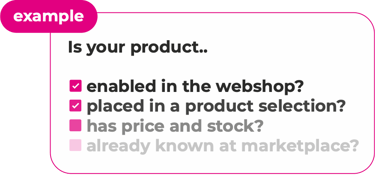
1. Troubleshoot a specific product
Start with a product that should be available on the marketplace but isn't. Using a specific product as an example makes it easier to identify where the issue occurs.
Follow the steps in our article about troubleshooting products that are not exported to a marketplace.
Don't have a specific product to troubleshoot? Continue with the checks below.
2. Check your product selection
Make sure the missing products are included in the product selection linked to the marketplace.
Also check whether any blocking rules in your channel offer settings prevent these products from being exported.
3. Check stock and delivery times
Make sure the products have stock available and check whether their delivery time is allowed for export.
Depending on the marketplace or your channel settings, products with certain delivery times or without stock may not be sent to the marketplace.
4. Check your product content
Some marketplaces require specific product information before they can publish a product.
Make sure you have completed the required content mapping and that all mandatory product information is available. Check the logging in EffectConnect for any errors returned by the marketplace for your content or offers.
5. Allow time for synchronization
Changes in EffectConnect are not always visible on the marketplace immediately. Make sure the regular synchronization intervals have passed before troubleshooting further.
6. Check the marketplace
A product can be successfully sent by EffectConnect but still not be published by the marketplace. The marketplace may reject the product or require additional information before putting it online.
EffectConnect does not always receive a status update explaining why a marketplace has not published a product. In these cases, you may also need to check the product directly in your marketplace account.
Tip: Check the knowledge base information for your specific marketplace. Some marketplaces have additional requirements or settings that affect whether products can be published.
If the products still don't appear after completing these checks, contact our Customer Success team. We'll help you further!