![logo-effectconnect-liggend-2021.png]](https://www.effectconnect.com/hs-fs/hubfs/Logo%20EffectConnect/logo-effectconnect-liggend-2021.png?height=24&name=logo-effectconnect-liggend-2021.png)
Go to
- About Hornbach
- Request a seller account
- Settings & configuration
- How to create and enrich content on Hornbach
- Repricer
- About the synchronization times
- Troubleshoot
About Hornbach
Hornbach is a German home improvement retailer with over 150 locations across Germany, the Netherlands, Austria, and other countries. In 2025, they launched a marketplace in Germany, with plans for future expansion into countries like the Netherlands.
This marketplace serves as a versatile platform where various sellers can present their products to a broad audience. The product range is extensive, including construction materials, garden accessories, and items across categories such as DIY, gardening and pet supplies, home and decor, and consumer electronics. Hornbach caters to both professionals and hobbyists, ensuring there is something for everyone.
Their marketplace operates on the Mirakl platform.
Request a seller account with Hornbach
 Hornbach currently offers its marketplace exclusively in Germany (DE).
- Sign up for Hornbach DE: registration form
-
Your warehouse must be located within the European Union, as the United Kingdom is excluded due to Brexit.
-
Customer support in the language of the country where you are selling is mandatory.
-
A German VAT number is mandatory due to EU tax regulations.
- Registration procedure
Once your registration is complete, your application will be assigned to a designated team for review. The time it takes for this process may vary based on their current workload. A Partner Manager will reach out to you to schedule an initial meeting. If your application is approved, the onboarding process will begin.
Ensure that you have a commercial seller account set up before adding Hornbach to EffectConnect.
Settings & configuration
Go to the App store in EffectConnect to add the Hornbach app or, for general information on how to add and configure a channel in EffectConnect, please refer to how to add and configure a channel in the Channel Manager.
Settings related to the Hornbach channel in EffectConnect include:
-
Nett price attribute (mandatory)
Price of the product, exclusive of VAT
Go to Hornbach DE > Settings > Prices - Base price attribute (optional)
Price for the base unit in euros, excluding the price per square meter, as applicable for flooring.
Ga naar Hornbach DE > Settings > Prices -
German language for offers and content
- Manufacturer Settings (GPSR)
Go to Settings > Offers
Here, you can add the settings for the manufacturer of your products.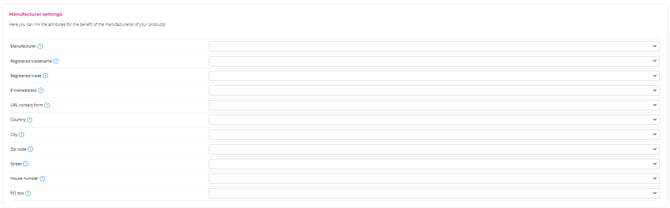
- Settings for Economic Operators GPSR)
Go to Settings > Offers
Here, you can connect the relevant settings for the economic operators of your products.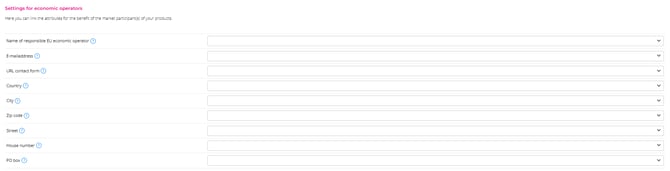
- Track & Trace codes are mandatory for all shipments (including regular mail and parcel deliveries), except for pallet and specialized logistics.
How to create or enrich content on Hornbach DE?
You can easily add or enrich product information by mapping it within EffectConnect.
To do this, go to the Hornbach channel in EffectConnect > go to tab Content Mapping.
For Hornbach, you must provide content in the language of the selling country through the content mapping. If you need assistance with translations, utilize our convenient Translations module,
Special Considerations
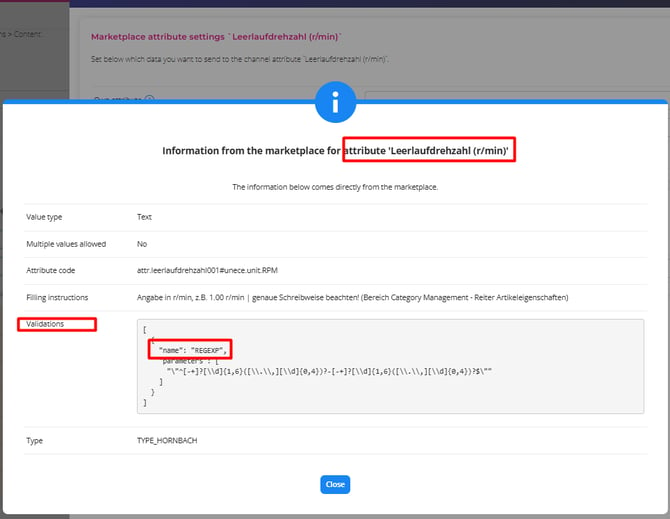
- Attributes that require RegEx (regular expression) validation must be entered with a hyphen separating the values, and no unit should be included. For example, for voltage, you would use: 220-230.
Repricer
Hornbach currently does not implement a buy box feature, which means that a repricer is not applicable at this time.
About the synchronization times
An Hornbach channel synchronizes according to the default synchronization times EffectConnect maintains. Read more about our synchronization times.
Troubleshoot
I don't have, or forgot, my API keys for configuring Hornbach
You can generate new keys inside your Hornbach seller central. If you don't know where to find them, please contact your account manager at Hornbach.
My (new) products are not appearing in my Hornbach account
- Check if you have created a mapping that includes all mandatory information.
- Ensure that the products are enabled in the selection for Hornbach within EffectConnect.
- Verify if there are any error messages related to the offers or content in EffectConnect.
- Confirm that the synchronization times are being adhered to.
Do you have any further questions after reading this article? Get in touch with us and we'll be happy to help!
📩 Email us at support@effectconnect.com
💬 Contact us via chat or give us a quick call