![logo-effectconnect-liggend-2021.png]](https://www.effectconnect.com/hs-fs/hubfs/Logo%20EffectConnect/logo-effectconnect-liggend-2021.png?height=24&name=logo-effectconnect-liggend-2021.png)
 Good to know: this document explains the must-knows about the marketplace. It doesn't explain how to add this channel to your EffectConnect account. If you would like to know how to add a channel in EffectConnect, read this article.
Go to
- About Decathlon
- Request a seller account
- Settings & configuration
- Create or enrich product data on Decathlon?
- Track & Trace mapping per shipping country
- About the synchronization times
- Troubleshoot
About Decathlon
Decathlon has been an authority in sports and retail for over 40 years. The company has built a reliable brand with a strong reputation, with more than 1,500 stores spread across over 55 countries. The Decathlon Belgium website attracts more than 13.6 million unique visitors monthly.
Request a seller account
- Sign up via the contact form on their website (Marketplace > Become a partner)
- Decathlon is a closed marketplace, which means they will assess whether you are a match.
 Make sure you have a seller account before connecting with Decathlon via EffectConnect.
Settings & configuration
For general information about adding and setting up a channel in EffectConnect, go to configure a channel in the Channel Manager.
At Decathlon, the sales countries are grouped under a single ShopID, meaning you only need one EffectConnect channel. In the product range, you have the option to configure your range by country.
The exception to this is when a country uses a currency other than the Euro, such as Poland or England. In that case, you will receive a separate ShopID at Decathlon, and a separate channel is also required in EffectConnect.
You can sell through Decathlon in multiple countries. Set the active countries in your Decathlon seller account and use the same settings in EffectConnect. Questions about these settings? Contact Decathlon.
Settings that apply only to Decathlon compared to other channels in EffectConnect are:
- Offer by country
Go to Settings > Product Offer > Offer by country settings.
Here you can link the values from an attribute to the countries in which you want to publish your offer. If you do not select an attribute or the attribute value is empty, the default value(s) will be used. - Sustainability attributes
Go to Settings > Settings > Product range > Sustainability attributes
Here, link the values from an attribute to the categories for which an Eco contribution is required. - Price per country
Go to Settings > Prices.
Here you can set a price attribute per country. If you do not select an attribute or the attribute value is empty, no different price for that country will be included. - Logistics class
Go to Settings > Delivery time > Logistics class mapping
Link your own attribute values to the possible logistics classes. You create the logistics classes in your Decathlon seller account, which we then retrieve
Create or enrich product data on Decathlon
You can easily add content (product information) per country by mapping it in EffectConnect.
Go to the Decathlon channel in EffectConnect > Content mapping and Base mapping
Mapping content by country
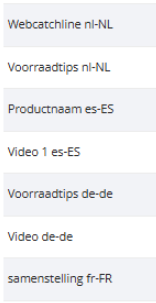
If you want to assign content for different countries, you can use the country codes for the attributes to identify them.
For example:
|
 |
Keep in mind that it is not possible to forward product information with HTML formatting to Decathlon. If you have HTML formatting in your descriptions, it will be filtered out when exporting to Decathlon.
Track & Trace mapping per shipping country
If you use different carriers per country, it is important that the correct carrier is linked to your Decathlon orders so that they can be marked as completed correctly.
With more than one carrier, you can set the correct carrier per shipping country in the Track & Trace mapping in EffectConnect.
Go to Orders > Track & Trace mapping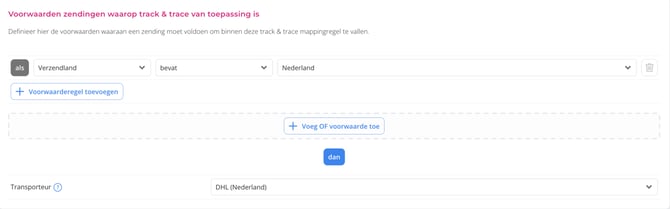
Shipping country = shipping country in the order, so the country you are shipping to.
Repricer
With this channel, you can use our Repricer to automatically adjust your prices based on your own formulas and rules.
More info about the repricer can be found here.
About the synchronization times
The synchronization with Decathlon follows EffectConnect’s standard synchronization intervals. Read more about our synchronization intervals.
Troubleshoot
My (new) products do not appear in my Decathlon account.
- Check if you have created a mapping that contains all the required data.
- Check if the products are in the product selection for Decathlon
- Check in EffectConnect if error messages are returned for the offers or content.
- If the products still do not appear online, please contact us for further support.